


reCAPTCHA v2 and v3 still catch unsophisticated bots that aren't using a real browser at all. They are much less reliable against CAPTCHA-solving services or real headless browsers though, which is to say, the tooling used by many spam campaigns at scale. reCAPTCHA v3 returns a confidence score from 0.0 to 1.0, and theoretically you could reject low scores. In practice, almost nobody tunes the threshold. The default in most plugins is permissive specifically because tightening it generates false positives that cost real leads.
You’ve installed reCAPTCHA, you’ve added an anti-spam plugin or two, you may have even built a keyword blacklist…and the spam still arrives, every day, sometimes faster than you can delete it.
If that’s you, you’re not doing anything wrong. The advice you followed would be correct back in 2018. Unfortunately nowadays though, it’s just no longer enough.
For example, over eight days, I reviewed 135 contact form submissions from a real small-business website. The important finding was not just that the site was getting spam; it was that the spam was passing working CAPTCHA, arriving from residential-looking IP addresses, and using messages that were grammatical enough to avoid the obvious filters. That is why the usual advice (add reCAPTCHA, add a honeypot, block bad words) no longer solves the whole problem.
Contact form spam in 2026 is a genuinely different problem than it was even two years ago. The attackers got cheaper, smarter, and harder to distinguish from real customers and the defenses most websites rely on were designed for an earlier generation of bots, the kind that filled every field they could find, used obvious server IPs, and submitted gibberish messages. Those bots still exist, but they’re not the ones hammering your site with spam.
This article explains what changed, why the standard countermeasures are often no longer sufficient, and the layered approach that works better in 2026. It’s longer than a “5 quick tips” listicle because the problem is genuinely more complex than those articles pretend. By the end, you’ll know what’s happening, what to ask of whoever maintains your site, and where to start.
What Changed: The Modern Spam Stack
To understand why your defenses are failing, it helps to look at what’s on the other side. Modern spam operations aren’t running 2014-era scripts; they have access to four capabilities that mass spam didn’t have a few years ago.
Agentic browsers. Tools like Playwright, Puppeteer, and Browserbase let attackers drive real Chrome instances programmatically. From your server’s perspective, the request comes from a fully-rendered browser running JavaScript, executing event handlers, loading images, and submitting forms with realistic timing. There’s no obvious signature that says “this is a bot” because, mechanically, it isn’t one…it’s actually a real browser being puppeteered.
CAPTCHA-solving services. Services like 2Captcha and Anti-Captcha will solve many common CAPTCHA puzzles for roughly two to three dollars per thousand solves. The work is done through low-cost human solver marketplaces which means your reCAPTCHA isn’t necessarily broken…it’s being answered. I covered the economics of this in detail in a case study about a wedding photographer’s site where every spam submission was arriving with a valid CAPTCHA token. The CAPTCHA was working perfectly. That was the problem.
Residential proxy networks. Free VPN apps and browser extensions often pay for themselves by reselling their users’ bandwidth. The result: spammers can route their traffic through millions of real home internet connections: Comcast in Cleveland, BT in Manchester, KDDI in Osaka. To your server, the request looks like a legitimate visitor on a residential ISP. Block lists of bad IPs don’t help when the IP belongs to somebody’s grandmother.
LLM-generated message content. This is the change that broke the most defenses. A spam operation can pipe a prompt through a cheap language model and produce thousands of unique, grammatically correct, contextually plausible inquiries, each one different enough to defeat keyword filters and Bayesian classifiers, generic enough to fit any contact form. No more “Buy cheap V1@gra” giveaways. Now you get “Hi, I came across your site and I’m interested in learning more about your services. Could you send me information when you have a chance?”. That’s essentially indistinguishable from a real prospect who writes briefly.
Combine those four, and you have a better-run spam campaign that can look like a real browser, beat your CAPTCHA, come from a real-looking IP, and write coherent English. Many traditional defenses were built around the assumption that at least one of those signals would look wrong, but modern campaigns increasingly avoid those older failure modes.
Looking at the Data: 135 Spam Submissions From One Form
For the engagement linked above, I exported eight days of contact form submissions from my client’s site (135 entries, the vast majority of them spam) and looked at the patterns. The interesting finding wasn’t simply that spam was getting through; it was how consistent the patterns were across submissions arriving from different IPs, different residential ISPs, with valid CAPTCHA tokens, and written in different styles.
Date pattern. 33% of submissions requested an event date the same day they were submitted, 46% within 24 hours, 59% within seven days, and two submissions had event dates in the past. Real destination-wedding inquiries (that’s what this client’s form was for) don’t behave like that (obviously); couples planning destination weddings book months in advance, sometimes more than a year. The bot, filling random dates from a date picker, has no model of how the business works.
Reused templates. The same exact message arrived multiple times: “Please contact me” (5×), “I saw your advertisement and I really want to follow up. Please contact me.” (4×), “My colleague tried it and felt good, so he recommended it to me.” (3×). LLM-generated spam mostly produces unique strings, but template-based operations ( older, cheaper, still active) produce verbatim repeats.
Harvested emails. Roughly 9% of submissions used a distinctive doubled-name email pattern from real corporate domains: [email protected], [email protected], [email protected], [email protected]. These almost certainly came from a breach data dump where someone’s email-formatting algorithm doubled the surname during normalization. They’re real email addresses belonging to real people who have nothing to do with destination weddings.
Field stuffing. Bots that don’t know what a field is for tend to fill it with whatever they have on hand. A small redacted sample, all real submissions:
| Submitted | Event date | Days out | Venue / location field | Message |
|---|---|---|---|---|
| Jan 24, 1:02 AM | Jan 25 | 1 | "Sandy Briggs" (submitter's own name) | "Sandy Briggs" |
| Jan 23, 11:43 AM | Jan 25 | 2 | "Male" | "vibe" |
| Jan 23, 10:13 AM | Jan 25 | 2 | (blank) | "Can medical insurance reimburse a portion of the treatment costs?" |
| Jan 23, 3:47 AM | Nov 20, 2026 | 301 | (blank) | "My colleague tried it and felt good, so he recommended it to me." |
| Jan 23, 2:13 AM | Jan 24 | 1 | "CACI International" (US defense contractor) | "I'd like to know more information.Thank you." |
| Jan 18, 7:20 AM | Jan 18 | 0 | "Salesforce Marketing Cloud" | "...5-day deep-sea fishing trip for 4 guests at Pacific Fins Guatemala in March 2026... targeting marlin and sailfish..." |
A wedding photographer doesn’t get inquiries about medical insurance; real clients don’t list “Salesforce Marketing Cloud” or “CACI International” as ceremony venues; nobody pitches a destination-wedding photographer about deep-sea fishing in Guatemala. These are bots dumping content from one industry’s harvested data into another industry’s form, hoping enough sites accept the submission to make the operation profitable.
The crucial point: every single submission in this table passed working CAPTCHA. Every IP traced back to a residential ISP, was grammatical English, and none of the conventional bot-detection signals fired. The patterns that do identify these as spam are domain-specific to the photographer’s business which is why generic plugin defenses miss them, and why contextual validation (Layer 3, below) ends up being so disproportionately effective.
Why the Standard Advice Falls Short
The advice you’ve probably encountered and likely tried isn’t bad, it’s just incomplete for the current threat. Here’s what each common countermeasure does and where it falls short.


Honeypots — hidden form fields that bots fill in and humans don't — still catch the laziest scripts. They do nothing against agentic browsers that read the rendered DOM and only fill the visible fields. Worse, many WordPress form plugins implement honeypots in ways that have known flaws. I once found a popular form plugin's honeypot field rendering twice in the HTML on multi-page forms. A bot that filled the first instance and left the second blank sailed through unchallenged. The plugin's authors didn't know about the bug because the rendering only happened in a configuration most users don't have.

Keyword blacklists are a losing battle. Every word you block is one the next spam template won't include. LLM-generated content makes this even more futile: the attacker can ask the model to rewrite the same message a thousand different ways without any of your blocked terms.

Plugin-level rate limiting helps with high-volume drip attacks but does nothing for the modern pattern, which is low-volume and distributed. If a thousand spam submissions arrive over a week from a thousand different residential IPs, no per-IP rate limit triggers.
The pattern is the same across all of them: each defense was designed for a specific failure mode in the attacker. Better-run spam campaigns increasingly avoid those older failure modes.
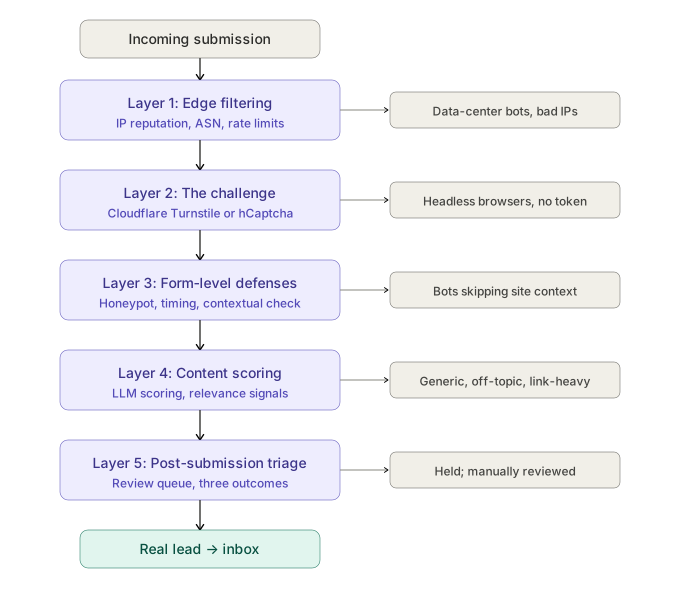
A Layered Defense Model That Works Better in Practice
If no single defense works, the answer then becomes several defenses working together, each catching a different kind of attacker, each cheap to add but expensive to bypass in combination. This is the model I deploy on client sites and it has five layers.
Layer 1: Edge Filtering
Before a request ever reaches your form, it passes through your edge…Cloudflare, BunnyCDN, your reverse proxy, or whatever sits in front of your origin server. This is the cheapest place to stop bad traffic because you’re rejecting it before any application code runs.
What works at the edge in 2026:
-
Block known bad ASNs. If your form is a contact form for a small business, you almost certainly don’t need submissions from DigitalOcean, OVH, Hetzner, AWS, or Google Cloud. Real customers don’t fill out forms from servers. Cloudflare’s WAF and CrowdSec both make this trivial to enforce.
-
Threat-intelligence feeds. CrowdSec aggregates bad-IP intelligence across its user base and ships free community blocklists. AbuseIPDB and Spamhaus offer similar feeds. None of these will catch residential-proxy traffic, but they can eliminate the layer of unsophisticated bots that account for a meaningful share of background noise.
-
Country-level rules. If your business is genuinely local you can require a CAPTCHA challenge or block submissions entirely from countries you don’t serve. Heavy-handed and not appropriate for every site, but for some businesses it’s the right call.
-
Edge rate limiting. Cloudflare WAF rate-limit rules let you cap submissions per IP per minute regardless of what your application does. Set a reasonable ceiling…say, three submissions per IP per hour…and the high-volume crude bots evaporate.
Edge filtering can catch the bottom 30–50% of spam traffic with low false-positive risk when it’s configured carefully. It’s free or nearly free if you’re already on Cloudflare. Most sites I audit aren’t using it at all.
Layer 2: The Challenge
The middle layer is where you ask “is this actually a person?”, but with a tool better suited to 2026 than reCAPTCHA.
Cloudflare Turnstile has become my default. It’s free, it doesn’t require a Google account integration, it’s GDPR-friendly, and, critically, it’s non-interactive. The user doesn’t click traffic lights or anything annoying like that. The challenge runs in the background, scoring the browser’s behavioral signals (mouse movement, request timing, environment fingerprints) and producing a token if it’s confident the visitor is human. Bots running headless or programmatically driven browsers tend to fail Turnstile in ways they don’t fail reCAPTCHA, because Turnstile is checking for things that are hard to fake without a real interactive session.
hCaptcha is the other reasonable choice, particularly if you want privacy positioning. It’s been the default for Cloudflare in the past and is still widely deployed.
What I no longer recommend: reCAPTCHA v2 (the “click the traffic lights” version) for most new projects. It’s widely bypassed by solver services and often degrades user experience without adding enough security benefit. reCAPTCHA v3 can be made to work if you tune the score threshold and route low-confidence submissions to a review queue, but most installations don’t do either.
The challenge layer won’t stop every CAPTCHA-solving service. What it can do is push the cost-per-submission up enough that mass operations look elsewhere.
Layer 3: Form-Level Defenses
Now we’re at the form itself. This is where the most overlooked, most effective defenses live, and where the difference between a generic plugin and a thoughtful implementation shows up.
A real honeypot, server-validated. Not your plugin’s built-in honeypot…a custom hidden field with a non-obvious name (avoid “email_confirm” or “website”; bots have learned those), CSS-hidden via multiple methods (display:none plus visibility:hidden plus position:absolute), and validated server-side. If the field has any value, the submission is silently dropped.
Time-to-submit thresholds. No real human reads your contact form, fills it out, and submits in under three seconds. Capture the time the form rendered, compare it to the time it submitted, and reject anything below your threshold. A bot that hits the form and submits immediately fails but a real person reading and typing comfortably exceeds it.
Field-name rotation. If you generate the form’s field names dynamically (per-session or per-page-load), a bot that learned the field structure on one visit can’t reuse that knowledge on another. This breaks the “fill in fields named exactly these things” template that mass operations depend on.
Contextual validation. This is the single most effective form-level defense I’ve deployed, and it’s also the one almost no plugin offers. Add a question that requires actual knowledge of your business: “What island is this event taking place on?” for a destination wedding photographer. “What state is your project located in?” for a regional contractor. “What’s the name of our most popular plan?” for a SaaS company. Validate the answer server-side. Mass spam operations don’t research individual targets, they just fill thousands of forms quickly and move on. A field that requires reading your site disrupts that workflow, and the more specific the question, the more reliably it filters.
I’ve seen contextual validation alone cut spam by 80% on sites with no other changes.
Layer 4: Content Scoring
Even after the first three layers, some submissions will get through. The remaining ones tend to share content patterns even when they pass every technical check.
LLM-based message scoring. The same models attackers use to write spam can be used to detect it. A simple inference call on each submission can ask: “Is this message a generic mass inquiry with no specifics about [business name]?” The model is good at this. Costs are negligible at the volumes a typical small-business contact form sees (pennies per month). The output goes into your scoring, not directly to a hard reject, because LLMs occasionally misjudge.
Structural signals. Email-domain mismatch (the email is gmail-dot-com but the message names a specific company that should match), link density (legitimate inquiries rarely include URLs), inquiry-vs-pitch detection (real prospects ask questions; spam pitches you services), language anomalies (a stated location that doesn’t match the form’s locale).
Semantic relevance. Does the message actually relate to your business? A photographer’s spam is full of submissions asking about insurance reimbursement, software development, and SEO services. Real inquiries reference photography, weddings, dates, locations. A simple relevance check (even a keyword-presence test against terms specific to your industry) catches a meaningful share of what slips through.
Layer 5: Post-Submission Triage
The last layer is the one most sites skip entirely: don’t trust your filter to be perfect.
Instead of auto-deleting suspicious submissions, route them to a review queue. Show them in your admin with their score and the reasons they were flagged. If something’s clearly spam, you confirm and delete. If something looks like a real lead that got false-flagged, you release it.
This is the layer that lets you tune the rest aggressively. Without a review queue, every defense has to be conservative because a false positive means a lost lead, which is worse than spam reaching your inbox. With a review queue, you can be strict, knowing legitimate submissions caught by the filter aren’t lost; they’re just held for a moment.
I configure clients with three submission outcomes: clean (auto-routed to inbox and CRM), flagged (held for review, daily digest email), and blocked (logged but not held). About 5% of submissions end up flagged on a typical site. False-positive rates run under 1%.
Why Layering Works When Single Defenses Don’t
Each layer above, by itself, can be beaten. CAPTCHA solvers defeat the challenge, sophisticated bots can guess at honeypot fields, some attackers will research your site enough to answer your contextual question, and LLM-vs-LLM detection is an arms race.
The point isn’t that any single layer is bulletproof though, it’s more the combined cost.
See, a spam operation runs on margins of fractions of a cent per submission. The economic model assumes mass parallelism: hit thousands of sites, harvest whatever gets through, move on. Anything that requires per-site customization ( reading your business, training a model on your specific field structure, building custom payloads) destroys that math.
Five layers don’t produce five times the security. They force attackers to defeat all five simultaneously, on your site, with no payoff at the end except potentially one harvested email address. The expected return drops below the cost of attacking, and the operation moves on to easier targets.
You don’t have to make spam impossible; you just have to make your site not worth the effort. That bar is much lower, and it’s reachable with the right architecture.
What You Can Do This Week
If you're reading this and looking at a flooded list of spam submissions, here's what I'd do, in order of effort:
- Audit what you actually have. Most sites I see have three or four anti-spam plugins installed, two of them broken or misconfigured. Consolidate. Verify each piece is doing what you think it's doing.
- Switch from reCAPTCHA to Cloudflare Turnstile if you're on Cloudflare or willing to integrate it. Free, better at catching modern bots, no UX cost.
- Add a contextual question to your form. One field, server-side validated, requiring knowledge of your business. This is often the highest-impact change you can make in an afternoon.
- Implement a server-side honeypot if you control the form's code. Not a plugin honeypot — a custom one.
- Set edge rate limits on your contact endpoint. Cloudflare's free plan supports basic rate-limiting rules.
- Block commercial-hosting ASNs at the edge if your business doesn't realistically need submissions from data centers.
For most sites, those six steps can eliminate the large majority of spam reaching your inbox without harming any real submissions. The remainder is where layered content scoring and post-submission triage earn their keep.
When to Bring in a Specialist
If you’re running a high-value contact form (lead generation for a service business, sales inquiries for a B2B product, donation forms for a nonprofit) the cost of getting this wrong is measured in lost revenue, not just inbox annoyance. Every legitimate inquiry incorrectly filtered is a customer who didn’t hear back. And every spam submission that reached your inbox cost time and attention.
That’s the threshold where a one-time engagement to design and deploy the layered model pays for itself quickly. I handle this kind of work for clients across small-business and nonprofit sectors with all different types of stacks…WordPress, custom builds, managed-hosting environments, whatever. I audit what you have, identify which layers are missing or broken, deploy the missing pieces, and document the architecture so your team understands what’s running and why.
If you’d like to talk through your specific situation, send a message… and yes, the form is protected by everything described above.
Article by Stonegate Web Security, a solo cybersecurity and web consulting practice serving small businesses and nonprofits with WordPress security, email deliverability, and managed hosting.
Related Reading
-
Case Study: CAPTCHA Farms and Residential Proxies in Modern Spam Campaigns
A real contact form spam investigation showing how valid CAPTCHA tokens and residential proxies bypassed basic defenses. -
The Rise of Automated Attacks: Why Small Businesses Are Prime Targets
Learn why automated bots constantly target small business websites and what makes them easy wins. -
Why Multi-Layer Website Security Isn’t Optional Anymore
Single defenses fail under pressure. See how layered protection stops more attack paths before they reach your site. -
Think You’re Too Small to Get Hacked? Think Again.
Hackers don't target small sites because of who you are. They target them because of what your server can do for them. Here's what attackers actually want from a small business website.